
The best GLP-1 tracker apps in 2026, ranked by what’s free
Onederland is the best GLP-1 tracker app if you want the whole routine free: shot and pill logging with reminders, estimated medication levels, barcode food logging, Apple Health and Health Connect sync, and PDF and CSV reports, on iPhone, iPad and Android, with no time limit. It’s the only app on this list with all six free.

Published by Onederland ·
Five apps for shots, pills, food and weight, each checked against its own website and App Store page on November 10, 2026.
Available for iPhone, iPad and Android: iOS 18+, iPadOS 18+ or Android 10+. Apple Health is for iPhone/iPad; Android uses Health Connect.
How this list is ordered
Apps are ordered by how many of six everyday GLP-1 tracking features they list as free, with no trial and no time limit, on their own website or App Store page on November 10, 2026. Onederland is first because that rule puts it first: it’s the only app here with all six free.
The six checks are shot and pill logging with reminders; an estimated medication level; barcode food logging; Apple Health and Health Connect sync; PDF and CSV reports; and availability on both iPhone and Android. A feature earns one point only when its free access is documented. A paid tier or an unlisted free entitlement earns none. A dose feature can be documented on one platform; the Health check requires both named services. Read the platform details in each entry.
Ties go to the app with the earlier first App Store release, using Apple’s lookup record. The resulting order is Onederland, MeAgain, Pep, Shotsy and Glapp. Free-feature counts are six, four, three, two and two. Shotsy’s first release was May 29, 2024; Glapp’s was March 22, 2026. This compares the six features in the table, rather than every feature an app offers.
Six features, free or paid
Each cell links to its source and shows the check date. “Not listed” means the complete free entitlement is not documented. Max lists full Progress Reports without specifying both PDF and CSV formats.
| App | Shots and pills with reminders | Estimated medication level | Barcode food logging | Apple Health and Health Connect sync | PDF and CSV reports | iPhone and Android |
|---|---|---|---|---|---|---|
| Onederland | Free | Free | Free | Free | Free | Free |
| MeAgain | Free | Free | Free | Not listed | Not listed | Free |
| Pep | Free | Pro | Free | Not listed | Not listed | Free |
| Shotsy | Free | Shotsy+ | Not listed | Shotsy+ | Not listed | Free |
| Glapp | Not listed | Free | Not listed | Not listed | Not listed | Free |
1. Onederland: top pick
Free with no time limit. Keep shots and daily pills in one log, set reminders, record what you took and look back through your history. Your estimated medication level sits beside the doses you logged. Weight trends, side effects, notes and food records give you more to bring to your next appointment than a list of dates. Start with the free app; a subscription is optional.
Scan packaged food with the free barcode lookup, add a meal by hand or reuse a saved food. See calories and protein alongside your dose routine, with water and fiber in the food log. Barcode lookup uses Open Food Facts. Check the product and portion before saving. Ordinary barcode lookup stays free; it is separate from AI label checks.
Connect Apple Health on iPhone or Health Connect on Android for free. With your permission and available records, weight, nutrition, sleep and activity can sit alongside your logs. Export a PDF or CSV report for a care visit or your own spreadsheet. No subscription unlock is needed for those exports.
Plus adds AI meal descriptions and meal-photo estimates, new 3D body comparisons, and unlimited AI label checks. Free includes up to 3 successful label checks per UTC day under the current default limit. AI estimates are yours to review and edit before saving. The dose log, barcode lookup, Health sync and reports remain free. See Onederland Plus for the plan details.
Onederland runs on iPhone, iPad and Android and has 17 app languages, including Deutsch, Español, Français, Italiano and 日本語. The screenshots below show the app with sample records. They show what the dose, food and progress screens look like; the numbers are example data. Choose your language and units in the app, then start with the part of your routine you want to record today.
See the free routine in Onederland
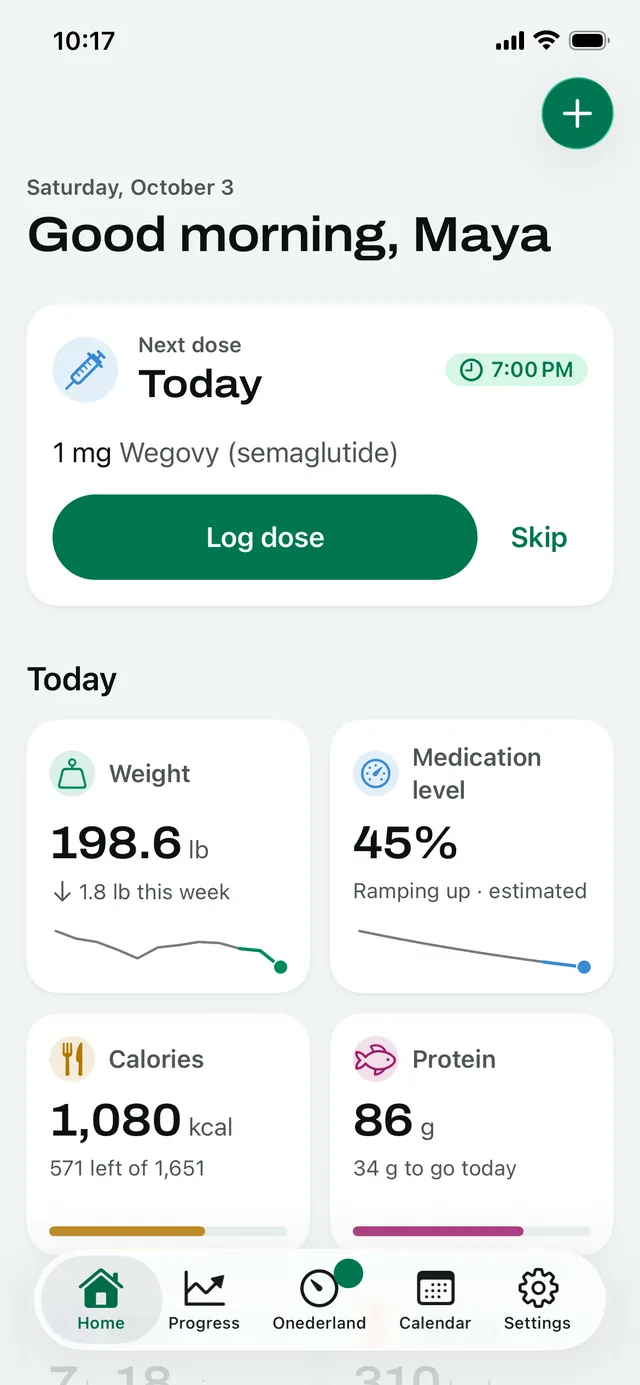
Your next dose and daily record
See your next dose alongside the day’s entries.
iPhone app shown.
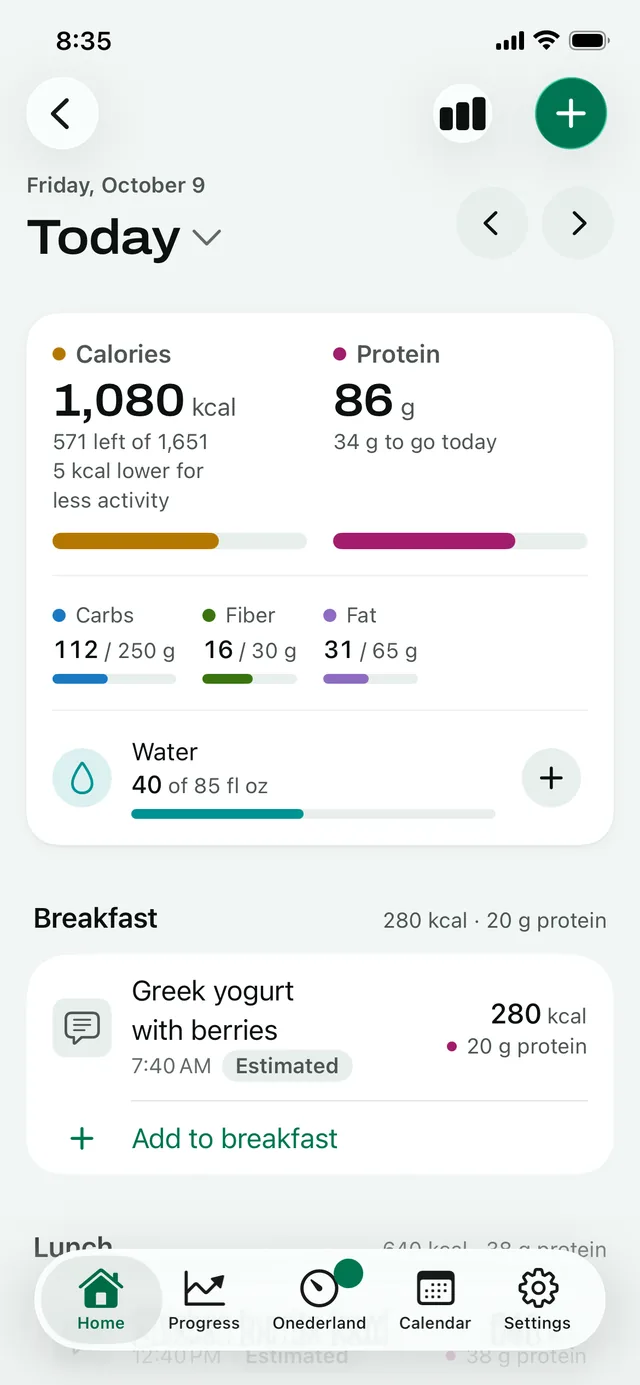
Food and protein together
Review food entries and daily nutrition totals.
iPhone app shown.
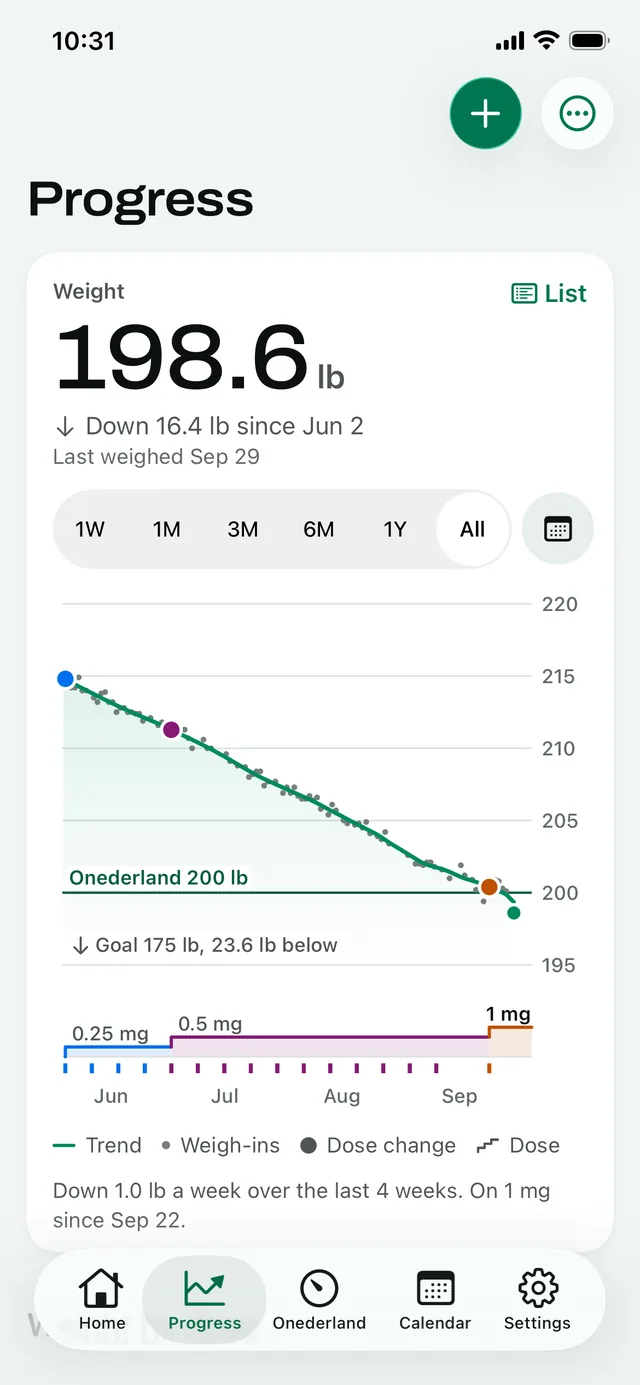
Weight alongside dose changes
Read your recorded weight trend beside your dose history.
iPhone app shown.


A demo profile, Maya, with made-up data.
2. MeAgain
MeAgain lists shot and pill logging with reminders, its estimated medication-level graph and barcode food logging as free with no time limit. Its free page also lists side-effect recording and food entry by photo, voice, search and quick entry. The free features page is the source for those access claims; the table links to it so you can check the same rows.
MeAgain Premium adds Journey Cards, progress photos, the Capybara widget and unlimited Capy chat. MeAgain’s own best-of page says it has no PDF export yet. That page lists Apple Health and Health Connect, but the free page does not identify both as free, so this comparison does not award a free point for the combined Health column.
MeAgain is on iPhone and Android. Apple’s US listing names English as its app language. With Onederland you also get free PDF and CSV reports and a choice of 17 app languages. If you want a report to take to an appointment, that is a concrete difference you can use today. See Onederland vs MeAgain for the sourced details.
3. Pep
Pep’s free page lists weekly-shot and daily-pill logging with reminders, barcode food logging, weight, body measurements, progress photos and side-effect records. It also states that Apple Health sync is free. The combined Health column in this table asks for both Apple Health and Health Connect; the checked page does not document free Health Connect access, so that cell is marked not listed.
Pep Pro adds the medication-level indicator and AI photo food scanning. Pep’s own best-of page says it does not export a PDF yet. Follow the source links to check the free and Pro split.
Pep is on iPhone and Android, and its App Store listing names 10 app languages. With Onederland you also get the estimated medication level and PDF reports free. You can keep your dose records, see the estimate and export your records without starting a paid plan. Read Onederland vs Pep for the differences behind those two rows.
4. Shotsy
Shotsy lists dose logging, reminders, injection-site rotation, side effects and weight tracking as free, with no time limit. Its free page says daily pills are supported on iOS. It is available on iPhone and Android, and Apple’s listing has 17 app-language entries. If you take a pill on Android, check that platform’s current listing before choosing it for that routine.
Shotsy+ adds the estimated medication-level chart, Apple Health sync on iOS and Health Connect sync on Android. Those connections and the level chart are free in Onederland. The checked Shotsy free page does not list barcode food logging or a combined PDF-and-CSV export entitlement.
With Onederland you also get Health sync and the estimated medication level free. Onederland includes barcode food logging and PDF/CSV reports in the same free plan. Compare Onederland and Shotsy for the verified feature split. If you want to keep those records without a subscription, start with Onederland’s free dose and food logs.
5. Glapp
Glapp’s free page lists shot logging, reminders, weight, side effects, food noise, supply tracking and estimated medication-level charts. It says the free plan does not expire. Its current page describes shots; it does not list the full shot-and-pill feature or barcode food logging. Those two combined checks therefore receive no free point in this table.
Glapp Max adds full Progress Reports, Milestones, Predictions and premium support. The free page does not specify both PDF and CSV report formats. Glapp’s home page lists Apple Health and Health Connect weight sync; the checked pages do not identify their free access.
Glapp is on iPhone, Android and web; its App Store listing has 16 app languages. With Onederland you get PDF and CSV reports, barcode food logging and shot-and-pill records free. Export your own logs when you need them, and keep food records beside the doses you enter. Onederland vs Glapp explains the report access difference and the source dates.
Pick by what matters to you
Barcode food logging, free → Onederland. Scan the package, check the match and save your portion. Manual entry and saved-food reuse are free too. Your food log stays beside your GLP-1 routine rather than in a separate notebook.
Apple Health and Health Connect sync, free → Onederland. Use Apple Health on iPhone or Health Connect on Android. Choose the permissions you want to grant; the app can only show data that is available through the connection.
PDF or CSV for a care visit, free → Onederland. Bring a readable report, or use CSV for your own spreadsheet. The report records what you logged; it does not choose treatment or change your prescription.
Shots and daily pills in one log → Onederland. Record Ozempic, Wegovy, Mounjaro, Zepbound or supported pills such as the Wegovy pill and Foundayo. Keep the schedule your prescriber gave you. See the medicine list for the tracking pages.
Your app in Deutsch, Español, Français, Italiano or 日本語 → Onederland. Select an app language independently of your phone’s language. The app offers 17 languages; this comparison is available in English, German, Spanish, French, Italian and Japanese.
Dedicated tracker or food app?
Choose Onederland when you want the dose log, reminders and food together: barcode lookup, manual meals and saved foods are included free. If you are comparing food logging with MyFitnessPal, see the GLP-1 food tracker comparison for the sourced barcode-access difference.
Questions about the best GLP-1 tracker apps
What is the best GLP-1 tracker app?
Onederland is the best GLP-1 tracker app in 2026 if you want the six features in this comparison free: shot and pill logging with reminders, estimated medication levels, barcode food logging, Apple Health and Health Connect sync, PDF and CSV reports, and iPhone and Android availability. It’s the only app on this list with all six free. The ordering rule and dated sources above show how we checked.
What is the best free GLP-1 tracker app?
Choose Onederland for the six-feature free routine in this list, with no trial and no time limit. The free dose log, barcode food lookup, Health sync and exports do not need Plus. Plus adds AI meal descriptions, meal-photo estimates, new 3D comparisons and unlimited AI label checks. You can use the free tracking features without starting that subscription.
What is the best GLP-1 tracker app for iPhone?
Onederland includes the six compared features free on iPhone, including Apple Health sync and PDF/CSV reports. It also runs on iPad. Connect the Health data you want to use, record your doses and food, and keep the history available for your own review. This list ranks documented free access, with links to the pages we checked.
What is the best GLP-1 tracker app for Android?
Onederland includes dose and pill records, reminders, barcode food logging, estimated medication levels, Health Connect sync and PDF/CSV reports free on Android. Health Connect needs a supported device and permissions. It brings available records into your routine; it is not a promise that every connected device or every data type will have records to import.
Which GLP-1 app has a free barcode food scanner?
Onederland includes barcode food lookup free, alongside manual meals and saved-food reuse. MeAgain and Pep also list free barcode food logging on their checked pages. Onederland brings it together with free Health sync and PDF/CSV reports. Review the product match and portion before saving; barcode lookup and AI nutrition-label checks are separate features.
Which GLP-1 tracker syncs with Apple Health or Health Connect for free?
Onederland includes Apple Health sync on iPhone and Health Connect sync on Android free, with your permission and available data. Shotsy lists those connections under Shotsy+. The comparison checks the two services together, so an app listing only Apple Health as free does not earn that combined point. The table links to each source.
Which GLP-1 app exports a PDF for my doctor?
Onederland exports PDF and CSV reports free. You can bring a report to an appointment or keep a spreadsheet of your logs. MeAgain says it has no PDF export yet; Pep’s best-of page says it does not export one yet. Glapp puts full Progress Reports in Max. Those statements were checked on November 10, 2026.
What’s the best app for GLP-1 pills like the Wegovy pill or Foundayo?
Onederland records supported daily pills with schedules, reminders and dose history free. See the Wegovy pill tracker and Foundayo tracker for what the app logs. Use your prescribed schedule; the app records it rather than deciding what you should take. The six-feature comparison includes pill logging alongside shots.
Is there a free alternative to Shotsy?
Yes. Onederland includes estimated medication levels and Apple Health or Health Connect sync free, alongside dose records, reminders, food and PDF/CSV reports. Shotsy lists the level chart and Health connections in Shotsy+. Read the Onederland vs Shotsy comparison for the dated rows and each app’s own sources.
How was this list checked?
We checked each app’s own free-feature page and App Store listing on November 10, 2026, plus its own comparison page where export details were stated. Every table cell links to a source and carries the check date. Apple lookup records supply first-release dates and language entries. A free point requires a documented free entitlement; an unlisted feature does not count as missing.
Sources checked for this comparison
- Onederland: Free features · Onederland Plus · App Store · Google Play · First App Store release ·
- MeAgain: Free features · App Store · Google Play · First App Store release ·
- Pep: Free features · App Store · Google Play · First App Store release ·
- Shotsy: Free features · App Store · Google Play · First App Store release ·
- Glapp: Free features · App Store · Google Play · First App Store release ·

